Sunday, October 1, 2017

SQL Server 2017 GA


Microsoft announced general availability of SQL Server 2017, coming October 2! This is an incredible milestone representing the first version of SQL Server to run on Windows Server, Linux and Docker—and it already has been pulled on Docker X 2 million times since November.

https://blogs.technet.microsoft.com/dataplatforminsider/2017/09/25/microsoft-for-the-modern-data-estate/

Monday, July 31, 2017

SQL DW Best pratices

Data Warehouse best practices
This is general guidance for DW and some of concept are based on customer’s scenarios, this is a only guidance and customers technical team can get an idea from here, applicability of this is depend on customers scenarios, this is information only document.

·        Identify the Dim and Fact
o   Dim : provide the descriptive context – attributes with the who, what, when, why, or how. They should always include friendly names & descriptions.
o   Dimension tables should *not* contain aggregatable numeric values (measures)
o   Fact: Fact tables contain the numeric, quantitative data (aka measures). Typically one fact table per distinct business process
·        Follow good naming convention to represent entity and attributes

·        Benefits of a Star Schema
o   Optimal for known reporting scenarios
o   Denormalized structure, structured around business logic, is good for performance & consistency
o   Usability for:
§  Stable, predictable environment
§  Less joins, easier navigation
§  Friendly, recognizable names
§  History retention
§  Integrate multiple systems Decoupled from source system

·        Performance of DW
o   Handling Larger Fact Tables
o   Clustered Columnstore Index
§  Reducing data storage due to compression of redundant values
§   Improving query times for large datasets
§  Improving query times due to reduced I/O (ex: column elimination)
§  suitable for:Tables over 1 million rows
§  Data structured in a denormalized star schema format (DW not OLTP) ü Support for analytical query workload which scans a large number of rows, and retrieves few columns
§  Data which is not frequently updated (‘cold’ data not ‘hot’)
§  Can selectively be used on insert-oriented workloads (ex: IoT)
o   Table Partitioning
§  Improving data load times due to partition switching
§  Flexibility for maintenance on larger tables
§  Improving query performance (possibly) due parallelism & partition elimination behavior
§  Speeding up ETL processes
§  Large datasets (50GB+) ü Small maintenance windows
§  Use of a sliding window ü Storage of partitions on separate drives (filegroups)
§  Older (cold) data on cheaper storage
§  Historical data on read-only filegroup ü
§  Speeding up queries (possibly) ,Partition elimination , Parallelism


·        Track History in a DW
o   Most common options for tracking history:
§  1. Slowly changing dimension
§  2. Fact snapshot tables
§  3. Timestamp tracking fact New option in SQL Server 2016:
§  4. Temporal data tables à Not a full replacement for slowly changing dimensions, but definitely useful for auditing

·        Handling of Nulls
o   Dimensions Rule of thumb is to avoid nulls in attribute columns.
o   Best practice is to avoid nulls in foreign keys. (However, nulls are ok for a measure.) By using an ‘unknown member’ relationship to the dimension, you can:
§   Safely do inner joins
§  Allow the fact record to be inserted & meet referential integrity
§  Allow the fact record to be inserted which avoids understating measurement amounts

·        Manually Maintained Data Maintain a DML script in a Lookup (LKP) table instead of hard-coding in the ETL
·        User SQL Data tool ( SSDT ) to compare schema and data

·        Extensibility in a DW Design

o   change in mind. Ex: Create a lookup table with code/descriptions, or implement in a view, rather than hard-coding in ETL.
o   Plan for a hybrid environment with multiple architectures. Introduce conformed dimensions first whenever possible.
o   Try to avoid isolated “stovepipe” implementations unless the isolation is absolutely intended. Conduct active prototyping sessions with business users to flush out requirements. A data modeling tool like Power BI works well for this.
o   Consider using an OLAP cube or in-memory model (like Analysis Services) for:
§   Summary data (as opposed to summary tables in your DW) • Year-to-Date type of calculations • Year-over-Year type of calculations • Aggregate level calculations (as opposed to row-by-row calculations)


Summary

·        DW Design Principles
o   Staging as a “kitchen” area
o   Integrate data from multiple systems to increase its value
o   Denormalize the data into a star schema
o   A column exists in one and only one place in the star schema
o   Avoid snowflake design most of the time
o   Use surrogate keys which are independent from source systems
o   Use conformed dimensions
o   Know the grain of every table
o   Have a strategy for handling changes, and for storage of history
o   Store the lowest level of detail that you can
o   Use an ‘unknown member’ to avoid understating facts
o   Transform the data, but don’t “fix” it in the DW
o   Structure your dimensional model around business processes
o   Design facts around a single business event
o   Always use friendly names & descriptions
o   Use an explicit date dimension in a “role-playing” way
o   Utilize bridge tables to handle many-to-many scenarios
o   Plan for complexities such as:
§  Header/line data
§  Semi-additive facts
§  Multiple currencies
§  Multiple units of measure
§  Alternate hierarchies and calculations per business units
§  Allocation of measures in a snowflake design
§  Reporting of what didn’t occur (factless facts)
§  Dimensional only analysis


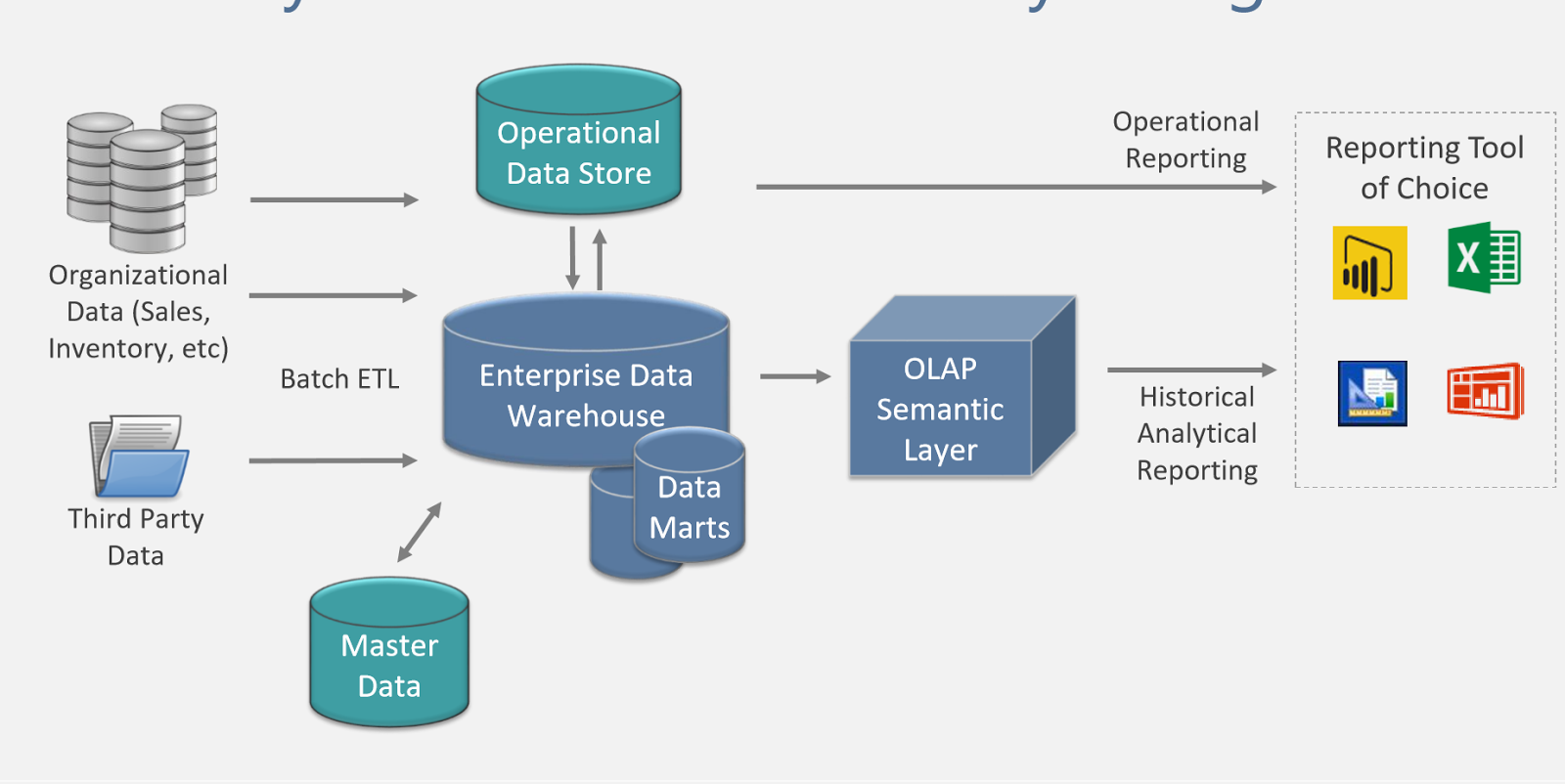
·        Reference architectures


Tuesday, June 6, 2017

Power BI - Create dim date table easly

get blank query and put below .. :)


//Create Date Dimension
(StartDate as date, EndDate as date)=>
let
    //Capture the date range from the parameters
    StartDate = #date(Date.Year(StartDate), Date.Month(StartDate),
    Date.Day(StartDate)),
    EndDate = #date(Date.Year(EndDate), Date.Month(EndDate),
    Date.Day(EndDate)),
//Get the number of dates that will be required for the table
    GetDateCount = Duration.Days(EndDate - StartDate),
//Take the count of dates and turn it into a list of dates
    GetDateList = List.Dates(StartDate, GetDateCount,
    #duration(1,0,0,0)),
//Convert the list into a table
    DateListToTable = Table.FromList(GetDateList,
    Splitter.SplitByNothing(), {"Date"}, null, ExtraValues.Error),
//Create various date attributes from the date column
    //Add Year Column
    YearNumber = Table.AddColumn(DateListToTable, "Year",
    each Date.Year([Date])),
//Add Quarter Column
    QuarterNumber = Table.AddColumn(YearNumber , "Quarter",
    each "Q" & Number.ToText(Date.QuarterOfYear([Date]))),
//Add Week Number Column
    WeekNumber= Table.AddColumn(QuarterNumber , "Week Number",
    each Date.WeekOfYear([Date])),
//Add Month Number Column
    MonthNumber = Table.AddColumn(WeekNumber, "Month Number",
    each Date.Month([Date])),
//Add Month Name Column
    MonthName = Table.AddColumn(MonthNumber , "Month",
    each Date.ToText([Date],"MMMM")),
//Add Day of Week Column
    DayOfWeek = Table.AddColumn(MonthName , "Day of Week",
    each Date.ToText([Date],"dddd"))
in
    DayOfWeek

Monday, June 5, 2017

Power BI on-prem gateway troubleshoot

Configuring proxy settings for the On-premises Data Gateway


Change the On-Premises Data Gateway service account

  1. Change the Windows service account for the On-premises Data Gateway service.
    The default account for this service is NT SERVICE\PBIEgwService. You will want to change this to a domain user account within your Active Directory domain. Or, you will want to use a managed service account to avoid having to change the password.
    You will want to change the account on the Log On tab within the properties of the Windows service.
  2. Restart the On-premises Data Gateway service.
    From an admin command prompt, issue the following commands.
    net stop PBIEgwService
    
    net start PBIEgwService
    
  3. Start the On-premises Data Gateway configurator. You can select the windows start button and search for On-premises Data Gateway.
  4. Sign in to Power BI.
  5. Restore the gateway using your recovery key.
    This will allow the new service account to be able to decrypt stored credentials for data sources.

Monday, May 8, 2017

SQL 2017on linux


Part 1

Create vm on Azure using below template.
Red Hat Enterprise Linux 7.3

Connect to linux vm ( install bitvise ssh client on local and connect to VM)

---- install
sudo su
curl https://packages.microsoft.com/config/rhel/7/mssql-server.repo > /etc/yum.repos.d/mssql-server.repo
exit

sudo yum install -y mssql-server

sudo /opt/mssql/bin/mssql-conf setup

systemctl status mssql-server

sudo firewall-cmd --zone=public --add-port=1433/tcp --permanent
sudo firewall-cmd --reload


Part 2

-------------- backup and restore
you can restore the backup taken on windows server to linux as it is.

take backup of windows backup and copy to /var/tmp/backup

sudo su
chown mssql:mssql AdventureWorksDW2016CTP3.bak
--show logical name infor
restore filelistonly from Disk='/var/tmp/backup/AdventureWorksDW2016CTP3.bak'


-- Restore database backup

restore DATABASE AdventureWorksDW2016Linux from Disk='/var/tmp/backup/AdventureWorksDW2016CTP3.bak' WITH FILE = 1,
MOVE 'AdventureWorksDW2014_Data' TO '/var/opt/mssql/data/AdventureWorksDW2016CTP3.mdf',
MOVE 'AdventureWorksDW2014_Log' TO '/var/opt/mssql/data/AdventureWorksDW2016CTP3_log.ldf',
NOUNLOAD,
STATS = 5
GO

Thursday, May 4, 2017

Power BI Premium

Power BI Premium

Previously available were two tiers, Power BI Free and Power BI Pro ($10/user/month).  The problem with Power BI Pro is that for large organizations, this can add up.  In addition, their performance needs might not be met.  Power BI Premium, which is an add-on to Power BI Pro, addresses the concern about cost and scale.

For costs, it allows an unlimited number of users since it is priced by aggregate capacity (see Power BI Premium calculator).  Users who need to create content in Power BI will still require a $10/month Power BI Pro seat, but there is no per-seat charge for consumption.
For scale, it runs on dedicated hardware giving capacity exclusively allocated to an organization for increased performance (no noisy neighbors).  Organizations can choose to apply their dedicated capacity broadly, or allocate it to assigned workspaces based on the number of users, workload needs or other factors—and scale up or down as requirements change.

There will be changes to the Power BI’s free tier.  Users of the free tier will now be able to connect to all of the data sources that Pro users can connect to, including those available through the on-premises data gateway, and their storage quota will increase from 1GB to 10GB.

 The data refresh maximum increases from once daily to 8 per day (hourly-based schedule), and streaming data rates increase from ten thousand rows per hour to one million rows per hour.

For Power BI Premium, you get 100TB of storage, data refresh maximum of 48 per day (minute-based schedule), and soon-to-be-available is that the dataset size cached limit is removed (it is 1GB in Power BI Pro), so you will be able to build models as large as the Power BI Premium dedicated capacity memory can hold (currently 50GB).

Upcoming features for Power BI Premium include the ability to incrementally refresh the data so that only the newest data from the last day (or hour) is loaded into Power BI, pinning datasets to memory, dedicated data refresh nodes, read-only replicas, and geographic distribution (see Microsoft Power BI Premium Whitepaper for more info).
Users of free tier will no longer be able to share their reports and dashboards with other users.  Peer-to-peer dashboard sharing, group workspaces (now called app workspaces), export to PowerPoint, export to CSV/Excel, and analyze in Excel with Power BI apps are capabilities limited to Power BI Pro.  The rationale for this is that if the scope of a user’s needs are limited to personal use, then no fees should apply, but if the user wishes to share or collaborate with others, those are capabilities that need to be paid for.  For existing users of the free service who have been active within the past year, Microsoft is offering a free, 12-month extended trial of Power BI Pro

If you are sharing dashboards/reports with free users, beginning June 1st they will need to take advantage of the extended Pro trial to continue accessing the content. After the extended trial expires, users will need a Pro license to maintain access.


Thursday, February 23, 2017

Performance tuning tips

1) Format disk with 64K

2) Put tempdb separate disk and add multiple tempdb files ( 2016 on wards)

3) Data Warehouse use Columstore index,this would give performance improvement and grate compression rate

4) OLTP use In-Memory

5) SQL Server defaults to a maximum degree of parallelism (MAXDOP) of 0, which dictates that SQL will dynamically allocate work up to the total number of CPU cores seen by the SQL service. With Hyper Thread turned on for a system with 80 physical cores, SQL will see a total of 160 cores which can, for many workload mixes, lead to a sub-optimal allocation of SQL threads. To address this, we can change the “Max Degree of Parallelism” parameter in SQL Server Advanced properties to less than or equal to the number of physical CPU cores as shown in following figure.
6) In order to reserve some memory for system processes, user processes, programs, etc., we can change the SQL Server “Maximum server memory” setting in SQL Server properties. Typically, a value of total system memory minus 8GB is sufficient. This means that SQL Server will allocate all available memory in the system, except for 8GB

7) every table should have Clustered index ( row or Columstore )

Friday, February 17, 2017

Shrink Tlog

use below script in SP and schedule it maintenance window.
checkpoint;
go
DBCC SHRINKFILE('log file name',25)


The following query will give you the reason on why log file is not getting reused.
select name,log_reuse_wait_desc from sys.databases
If you get nothing as description for the logfile you will also be able to shrink the log file

Tuesday, January 3, 2017

SQL auto stats on or off


SELECT name AS 'Name', 
    is_auto_create_stats_on AS "Auto Create Stats",
    is_auto_update_stats_on AS "Auto Update Stats",
    is_read_only AS "Read Only" 
FROM sys.databases
WHERE database_ID > 4;


ALTER DATABASE YourDBName SET AUTO_CREATE_STATISTICS ON

Thursday, July 14, 2016

get adhoc sql load in sql server


select objtype,p.size_in_bytes,sql.text
 from
sys.dm_exec_cached_plans p
outer apply sys.dm_exec_sql_text( p.plan_handle) sql

Wednesday, March 30, 2016

SQL Server 2016 New Features


  • Real-Time Operational Analytics

  • In-Memory Optimization (OLTP) enhancements

  • Stretch Database

  • Always Encrypted

  • Query Data Store and Live Query Statistics ( Simile to Oracle Diagnostic Pack)

  • PolyBase  ( BigData query layer )

  • Row-Level Security and Dynamic Data Masking

  • High availability and disaster recovery using Microsoft Azure Virtual Machines


details coming sooooooooon

Friday, March 4, 2016

Manually determining the number of cores on your computer

You can use the Windows Management Instrumentation Command-line tool (WMIC) to determine how many physical cores your server has. This is useful if you do not know whether your computer will meet the minimum hardware requirements for installing Tableau Server.
  1. Open a command prompt.
  2. Enter the following command:
    WMIC CPU Get DeviceID,NumberOfCores
    The output will display the device id or ids and the number of physical cores the computer has:
    In the above example there are two CPUs, each with six cores, for a total of twelve physical cores.
    A longer command will list the logical processors as well as the physical cores:
    WMIC CPU Get DeviceID,NumberOfCores,NumberOfLogicalProcessors,SocketDesignation
    In the above example, in addition to the twelve physical cores, there are 24 logical cores. ( hyperthreading * physical cores e.g 2* 12) 

Tuesday, February 16, 2016

Calculate memory need for SQL Server


SQL Max Memory = TotalPhyMem - (NumOfSQLThreads * ThreadStackSize) - (1GB * CEILING(NumOfCores/4)) - OS Reserved

NumOfSQLThreads = 256 + (NumOfProcessors*- 4) * 8 (* If NumOfProcessors > 4, else 0)
ThreadStackSize = 2MB on x64 or 4 MB on 64-bit (IA64)
OS Reserved = 20% of total ram for under if system has 15GB. 12.5% for over 20GB

Monday, February 15, 2016

All database users and their roles associated

 -- all the database users and their roles

SELECT  members.name, roles.name,roles.type_desc,members.type_desc
FROM sys.database_role_members rolemem
INNER JOIN sys.database_principals roles
ON rolemem.role_principal_id = roles.principal_id
INNER JOIN sys.database_principals members
ON rolemem.member_principal_id = members.principal_id
ORDER BY members.name


 ---- Check SQL Server Audit level
 DECLARE @AuditLevel int
EXEC master.dbo.xp_instance_regread N'HKEY_LOCAL_MACHINE',
   N'Software\Microsoft\MSSQLServer\MSSQLServer',
   N'AuditLevel', @AuditLevel OUTPUT
SELECT CASE WHEN @AuditLevel = 0 THEN 'None'
   WHEN @AuditLevel = 1 THEN 'Successful logins only'
   WHEN @AuditLevel = 2 THEN 'Failed logins only'
   WHEN @AuditLevel = 3 THEN 'Both failed and successful logins'
   END AS [AuditLevel]
 

 ---Find failed login events in SQL Server error log
 
   EXEC master.dbo.xp_readerrorlog 0, 1, 'login failed', null, NULL, NULL, N'desc'
 
-- show all options
 
   EXEC sp_configure 'Show Advanced Options', 1;
GO
RECONFIGURE;
GO
EXEC sp_configure;

Tuesday, February 9, 2016

Resource governer

Pool:
 A resource pool, or pool, is a collection of system resources such as memory or CPU; it represents a portion of the physical resources of the server.
Depending on its settings, a pool may have a fixed size (its minimum and maximum resource usage settings are equal to each other) or have a part which is shared between multiple pools
(its minimum is less than its effective maximum). "Shared" in this case simply means that resources go to the pool that requests the resources first. In the default configuration all
resources are shared, thus maintaining backward compatibility with SQL Server 2005 policies. Two resource pools (internal and default) are created when SQL Server 2008 is installed.
Resource Governor also supports 18 user-defined resource pools. You specify MIN and MAX values for resources (CPU or Memory) which represents the minimum guaranteed resource availability
of the pool and the maximum size of the pool, respectively. The sum of MIN values across all pools cannot exceed 100 percent of the server resources. MAX value can be set anywhere in the
range between MIN and 100 percent inclusive. The internal pool represents the resources consumed by the SQL Server itself. This pool always contains only the internal group,
and the pool is not alterable in any way. Resource consumption by the internal pool is not restricted. Any workloads in the pool are considered critical for server function, and Resource Governor allows the internal pool to pressure other pools even if it means the violation of limits set for the other pools. The default pool is the first predefined user pool. Prior to any configuration the default pool only contains the default group. The default pool cannot be created or dropped but it can be altered. The default pool can contain user-defined groups in addition to the default group.

Group:
 A workload group, or group, is a user-specified category of requests that are similar according to the classification rules that are applied to each session request. A group defines the policies for its members. A resource pool is assigned to a Workload Group, which is in turn is assigned to the Resource Governor. Two workload groups (internal and default) are created and mapped to their corresponding resource pools when SQL Server 2008 is installed, apart from that the Resource Governor also supports user-defined workload groups. The internal workload group is populated with requests that are for internal SQL Server use only. You cannot change the criteria used for routing these requests and you cannot classify requests into the internal workload group whereas requests are mapped to default workload group, if there is a classification failure, an attempt to map to a non-existent workload group and there is no criteria to classify. If the Resource Governor is disabled, all new connections are automatically classified into the default group and System-initiated requests are classified into the internal workload group.

Classification:
Classification is a set of user-written rules that enable Resource Governor to classify session requests into the workload groups as described previously; for example classifying on the basis of user, application etc. It is implemented through a scalar Transact-SQL user-defined function (UDF) which is designated as a "classifier UDF" for the Resource Governor in the master database. Only one user-defined function can be designated as a classifier at a time

First I will create two resource pools to be used by OLTP and Reporting application,
then I will create two workload groups which will categorize the request coming from these applications.

Working with Resource Governor 

--Resource pool to be used by OLTP Application
CREATE RESOURCE POOL OLTPPool
WITH
(
 MIN_CPU_PERCENT=50, MAX_CPU_PERCENT=100,
 MIN_MEMORY_PERCENT=50, MAX_MEMORY_PERCENT=100
)
GO
--Resource pool to be used by Report Application
CREATE RESOURCE POOL ReportPool
WITH
(
 MIN_CPU_PERCENT=50, MAX_CPU_PERCENT=100,
 MIN_MEMORY_PERCENT=50, MAX_MEMORY_PERCENT=100
)
GO
--Workload Group to be used by OLTP Application
CREATE WORKLOAD GROUP OLTPGroup
    USING OLTPPool ;
GO
--Workload Group to be used by Report Application
CREATE WORKLOAD GROUP ReportGroup
    USING ReportPool ;
GO  


Next I will create the classifier UDF to route incoming request to different workload groups and finally I will enable Resource Governor with ALTER RESOURCE GOVERNOR RECONFIGURE statement.

Assumption here is, the OLTP application uses "OLTPUser" login whereas reporting application uses "ReportUser" login.

 USE master;
GO
CREATE FUNCTION dbo.ResourceClassifier()
RETURNS SYSNAME
WITH SCHEMABINDING
AS
BEGIN
 --Declare the variable to hold the value returned in sysname.
 DECLARE @WorkloadGroup AS SYSNAME
 --If the user login is 'OLTPUser', map the connection to the
 --OLTPGroup workload group.
 IF (SUSER_NAME() = 'OLTPUser')
  SET @WorkloadGroup = 'OLTPGroup'
 --If the user login is 'ReportUser', map the connection to
 --the ReportGroup workload group.
 ELSE IF (SUSER_NAME() = 'ReportUser')
  SET @WorkloadGroup = 'ReportGroup'
 ELSE
  SET @WorkloadGroup = 'default'
 RETURN @WorkloadGroup
END
GO
--Register the classifier user-defined function and update the
--the in-memory configuration.
ALTER RESOURCE GOVERNOR
WITH (CLASSIFIER_FUNCTION=dbo.ResourceClassifier);
GO
--Enabling Resource Governor(By default when you install
--SQL Server, Resource Governor is disabled)
--It loads the stored configuration metadata into memory
ALTER RESOURCE GOVERNOR RECONFIGURE
GO
--Disabling Resource Governor
ALTER RESOURCE GOVERNOR DISABLE
GO
--It resets statistics on all workload groups and resource pools.
ALTER RESOURCE GOVERNOR RESET STATISTICS
GO


Resource Governor's Catalog Views and Dynamic Management Views

There are three new Catalog Views and three new Dynamic Management Views introduced for Resource Governor.

sys.resource_governor_configuration - used to display the Resource Governor configuration as stored in metadata.

sys.resource_governor_resource_pools - used to display resource pool configuration as stored in metadata.

sys.resource_governor_workload_groups - used to display workload group configuration as stored in metadata.

sys.dm_resource_governor_configuration - used to get the current in-memory configuration state of Resource Governor

sys.dm_resource_governor_resource_pools - used to get the current resource pool state, the current configuration of resource pools, and resource pool statistics.

sys.dm_resource_governor_workload_groups - used to get the workload group statistics and the current in-memory configuration of the workload group.

Monday, February 8, 2016

Query writing techniques


1) SELECT only the columns and rows needed.
SQL query becomes faster if you use the actual columns names in SELECT statement instead of than '*‘ and the fewer rows. Also this would  reduce the amount of data needs to be transferred through the network   ,also optimizer pickup the correct indexes otherwise it’ll do a full table scan.


For Example: Write the query as
           SELECT id, first_name, last_name, age, subject FROM student_details;
           Instead of:
           SELECT * FROM student_details; 


2) Try to minimize the number of sub query block in your query
Sometimes you may have more than one sub queries in your main query ( may be correlated subquery ). Try to minimize the number of sub query block in your query. this would give better performance.
For Example: Write the query as
         SELECT name   FROM employee   WHERE (salary, age ) = (SELECT MAX (salary), MAX (age)          FROM employee_details)  AND dept = 'Electronics';
         Instead of:
         SELECT name FROM employee   WHERE salary = (SELECT MAX(salary) FROM employee_details)          AND age = (SELECT MAX(age) FROM employee_details)   AND emp_dept = 'Electronics'; 


3) Perform order by operation as required
Perform order by operation as required try to use numeric field for sort operation.it would give better performance than use of string field.

For Example: Write the query as
        Select e_id,name ,age,salary from employee order by e_id;


4) Use operator EXISTS, IN and table joins appropriately in your query.


  • Usually IN has the slowest performance.
  • IN is efficient when most of the filter criteria is in the sub-query.
  • EXISTS is efficient when most of the filter criteria is in the main query.

For Example: Write the query as
        Select * from product p  where EXISTS (select * from order_items o where o.product_id = p.product_id)
Instead of:
       Select * from product p  where product_id IN (select product_id from order_items )


5) Try to use UNION ALL in place of UNION. unless you need to retrieve distinct set of records
For Example: Write the query as
       SELECT id, first_name FROM student_details_class10
       UNION ALL
       SELECT id, first_name FROM sports_team;
Instead of:
        SELECT id, first_name, subject FROM student_details_class10
        UNION
        SELECT id, first_name FROM sports_team;  


6) Write ANSCI complaint SQL, it's more clarity
 

User INNER JOIN,OUTER JOINS etc. in the query,
 

SELECT ename, dname FROM emp left outer join  dept  on emp.deptno   = dept.deptno;
SELECT ename, dname FROM emp inner join  dept  on emp.deptno   = dept.deptno;
Instead of:
SELECT ename, dname FROM emp, dept WHERE emp.deptno (+) = dept.deptno;
SELECT ename, dname FROM emp, dept WHERE emp.deptno  = dept.deptno;


7) Be careful while using <>,!= operators in WHERE clause. 
Even though indexes are in pleased for the columns, above operators (<> != ) are ignored by oracle optimizer , therefore try to implement positive conditions as possible.
For Example: Write the query as
SELECT id, first_name, age FROM student_details WHERE age != 10; 


8) Be careful while using functions/calculations in WHERE clause. 
Usage of functions in predicates will ignore the indexes, try to avoid it or add function base index for those predicates.
For Example: Write the query as
------------------------------------------------------------------------------------------------------------
SELECT id, name, salary FROM employee WHERE dept = 'Electronics' AND location = 'Bangalore';
Instead of:
SELECT id, name, salary FROM employee WHERE dept || location= 'ElectronicsBangalore';
------------------------------------------------------------------------------------------------------------
SELECT id, name, salary FROM employee WHERE salary < 25000;
Instead of:
SELECT id, name, salary FROM employee WHERE salary + 10000 < 35000;


9) Be careful while using  LIKE operators in WHERE clause. 

Where using LIKE in WHERE clause ,NEVER use % in beginning of where condition. Oracle will not use index .Always put some value in beginning then use %.
ename like ‘%CO%’ ; — Index will not be used ename like ‘SC%’; — Index will be used

SQL Server connection string for mirror ( automatic failover ) database...


Connection string on application side

Server=192.168.4.14\mssqlserver1,41076; Failover Partner=192.168.4.14\mssqlserver2,49250; Network=dbmssocn; Connection Timeout=60; database=testdb1; User ID=sa; password=1qaz2wsx@; Pooling=True;

Below are the mandatory attributes
Server
Failover Partner
Network=dbmssocn;
Database


Find all text occurrence in a given text TSQL


declare @prodId int
declare @mrPosition int
declare getproduct cursor for select mrid,mrgeneration from [dbo].[master28_descriptions_Final_ind]
    where mrDESCRIPTION like '%IMG%' order by mrid

declare @imgString varchar(200)
declare @endPos int
declare @desc nvarchar(max)
declare @position int
declare @outputDesc varchar(max)

    open getproduct
fetch next from getproduct into @prodId,@mrPosition
--print @prodId
while @@FETCH_STATUS = 0
begin

            -- get product Id
    select @desc= mrDESCRIPTION from [dbo].[master28_descriptions_Final_ind]   where mrid = @prodId and mrgeneration= @mrPosition
   --print @desc
  --gets the index of the first instance of <img
    select @position = CHARINDEX('<img', @desc)


    while @position < len(@desc)
    begin
        --this assumes that we are not at the end of the description field
        if (SUBSTRING(@desc, @position, 4) = '<img')
        begin

--print @position
--print 'im in the loooopp' + SUBSTRING(@desc, @position, 500)
     
        select @endPos = charIndex('/>', substring(@desc, @position, 500))
                select @imgString = substring(@desc, @position, @endPos)

    --insert into dbo.ProductImage(ProductId, ImageUrl, DisplayName, IsPrimaryImage)
        --            select @prodId, @imgString, DisplayName, 0
        --            from Product where Id = @prodId
        --                         and not exists (select ImageUrl from ProductImage where ProductId = @prodId and ImageUrl = @imgString)

--print @endPos
print REPLACE( @imgString,'__d','.')

-- TODO
-- insert into tbl_output (mrid,image_path) values ( @prodId,@imgString)
             
select @outputDesc = REPLACE(@desc, @imgString, 'QQQQQQQQQQ')

--print REPLACE(@desc, @imgString, 'QQQQQQQQQQ')

                --select @outputDesc = Replace(@outputDesc, '</img>', '')

                select @position = @endPos

--print @position
        end
        else
        begin
            -- if we have reached here, there are no more instances of <img
            -- set @position to end of description field to prevent continuous looping
            select @position = len(@desc)
        end
    end

    select @outputDesc

    update [master28_descriptions_Final_ind]
    set mrDESCRIPTION = @outputDesc
    where mrId = @prodId and mrgeneration= @mrPosition

    --select Description from Product where Id = @prodId

fetch next from getproduct into @prodId,@mrPosition
end

close getproduct
deallocate getproduct

Convert HTML string to plan text in SQL Server

create function dbo.StripHTML( @text varchar(max) ) returns varchar(max) as
begin
    declare @textXML xml
    declare @result varchar(max)
    set @textXML = REPLACE( @text, '&', '' );
    with doc(contents) as
    (
        select chunks.chunk.query('.') from @textXML.nodes('/') as chunks(chunk)
    )
    select @result = contents.value('.', 'varchar(max)') from doc
    return @result
end
go

select dbo.StripHTML('This <i>is</i> an <b>html</b> test')